

A business automation project needs a problem small enough to test and important enough that someone wants it fixed. “Use AI in our company” does not give your team that starting point. “Stop entering the same order into two separate records” does.
Choose one task your staff can show you today. Watch it happen from the first input to the final handoff. The useful details are often in the interruptions: someone cannot find a rate, a quantity is missing, an approval waits until the owner returns, or two people work from different versions.
Start with a task, a person and a correct result
Write down who does the work, where the information comes from and what the next person needs. Keep the description short enough to explain aloud.

For example: “Our office assistant receives an order, checks the item and quantity, enters it in the order list and tells planning what to prepare.” That is a workflow. You can observe it and test an improvement against it.
A correct result needs more detail. Which item codes are valid? Who can change the delivery date? What happens if the customer sends a revised order? Which fields must a person approve? These answers are the first requirements for a tool, even if the tool is just a better form.
Measure the current work before changing it
Record a small representative sample. For each task, note the time spent, time waiting, rework and unresolved questions. Include busy days and awkward cases. Ask staff whether the sample reflects an ordinary week.
Separate typing time from waiting time. A form might remove repeated entry without changing the time needed for a manager to approve a special request. That is still useful, but the claim should describe what actually changed.
Do not count every saved minute as immediate revenue. People may use that time for follow-up, stock checks, planning or less overtime. Those benefits need their own evidence.
An illustrative pilot
Consider a fictional distributor that receives repeat orders through email and messages. An office assistant copies each order into a spreadsheet. The customer sometimes uses a different name for the same item, so the assistant checks with sales before entering it.
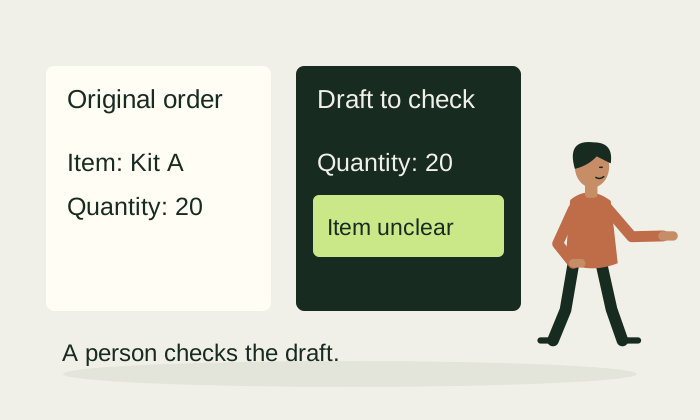
A narrow pilot could prepare a draft order from the incoming document. The assistant would see the original beside the extracted details. Unknown item names would stay flagged. Only approved records would reach the order list.
This is a hypothetical design, not a NitiSol client story. No saving or accuracy result is assumed. The first test is whether the draft is correct and easy to check; the second is whether the assistant spends less effort on the task.
Start with one order format and one staff group. Keep the existing process available during the test. If the source document is unreadable, the tool should send it to manual entry rather than guess.
Agree what the pilot must pass
Use acceptance checks the team can understand:
The reviewer can see the source document and every extracted field. Missing or uncertain information stays visible. A changed order does not silently replace an approved one. A person can correct a mistake and see what changed. Access is limited to people who need the information. A failed connection leaves a visible pending task rather than losing the record.
Compare the pilot with the baseline using the same types of tasks. Include review and correction time. If you exclude difficult cases, say so. An attractive demonstration is not enough evidence for wider rollout.
Decide whether to expand
The tool may pass the correctness checks but still feel awkward to use. Listen to the people doing the work. A simpler screen, fewer fields or a clearer exception list may matter more than adding another feature.

Before expanding, agree who will support the tool, what happens when connected software changes and how the business can export its records. Training should use the tasks people actually perform. The final decision should consider usefulness, ongoing effort and the cost of maintaining the change.
Bring NitiSol one repeated task and a blank example of the record involved. We can discuss what to observe, what would make a useful first version and how the test should work. Scope, access and any commercial offer would be agreed before implementation.
Draft for editorial and business review. Example workflows are possibilities to scope, not claims of delivered customer results.