

A customer sends a WhatsApp message. The business has received an enquiry, but the work has only begun. Someone needs to understand the request, find the correct information and decide what to do next.
Before choosing a bot or a shared inbox, map that sequence. A useful setup depends on how your team works and what customers ask. A small business may get further with organised replies and labels than with a custom system it cannot maintain.
Understand the conversation first
Review a consented, appropriately anonymised sample of enquiries. Group the questions your staff actually receive: product availability, specifications, delivery, service requests or a request to speak to someone.

For each group, ask who owns the answer and where the correct information lives. “What is your price?” may need a current rate list. “Can you deliver on Friday?” may need a stock and dispatch check. These questions should not receive the same generic reply.
The team should also decide when to ask for missing details. A brief enquiry is not permission for software to invent a quantity, specification or delivery promise.
Choose the starting setup
The WhatsApp Business app includes tools such as quick replies and labels. Those can help a small team organise common questions. The Business Platform supports more programmable conversations and integrations. These are different options with different setup and ongoing requirements. Official app features, official platform features.
Choose the smallest setup that solves the actual problem. If one person can manage enquiries with consistent replies, a custom integration may add effort without adding much value. If several departments must act on each enquiry, a shared record and clear ownership may matter more.
An illustrative enquiry flow
Imagine a fictional industrial supplier receiving a message: “Do you have this component?” The customer attaches a photograph but no product reference.
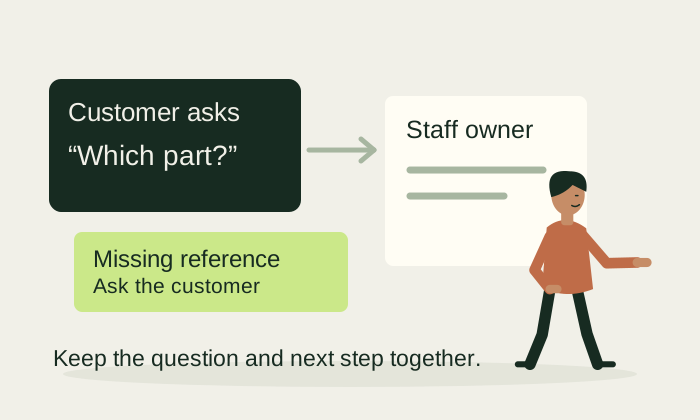
The enquiry record could contain the original message, the staff owner and the missing detail. The team asks for the product reference or an approved specification. Once that arrives, sales checks the current catalogue and availability. A person confirms the reply before a quotation or delivery promise is sent.
If the question requires technical judgement, it goes to the qualified team. If nobody has answered, an internal reminder flags the pending work. The reminder does not send a guessed answer to the customer.
This is a hypothetical workflow. Whether it can connect to your records depends on supported interfaces, account permissions, data quality and an agreed implementation scope.
Make the staff handoff clear
A customer should know how to reach a person. Within the business, that person needs the conversation, the previous answer and the reason for escalation. Making the customer repeat everything defeats the purpose of the handoff.
Define what the system can answer, what it can prepare for review and what it must refuse to guess. Useful tests include an unknown product, an old price file, an angry customer, an unclear photograph and a request outside normal hours.
Keep approved answers tied to a source and an update date. If the source is missing or outdated, the workflow should ask for review. A fluent answer is not proof that it is correct.
Check messaging requirements before building follow-up
For the Business Platform, current rules require opt-in for subsequent outreach, approved templates for initiated messages and replies outside the 24-hour customer-service window, respect for opt-outs and a clear route to human support. Some sectors and message purposes are restricted. Check the current WhatsApp Business Messaging Policy before implementation.

Do not treat a purchased contact list, a customer phone number or a prior enquiry as unrestricted permission to send marketing. Document the purpose and permission needed for the planned messages. Keep pricing and template approval requirements in the project scope; neither should be assumed from an old screenshot.
Measure the enquiry process
Track whether an enquiry receives an owner, how long a useful answer takes and which conversations need manual investigation. Record actual suitable enquiries, quotations and next steps. A chat button opening is different from a sent message, and a sent message is different from a sale.
The useful outcome may be clearer responsibility rather than more message volume. Your sales team should be able to see what is waiting, who owns it and what needs to happen next.
Tell NitiSol how customer questions reach your business and where the follow-up becomes difficult. We can assess the simplest useful setup and the information, permissions and testing it would require.
Further reading
Draft for editorial and business review. Example workflows are possibilities to scope, not claims of delivered customer results.